




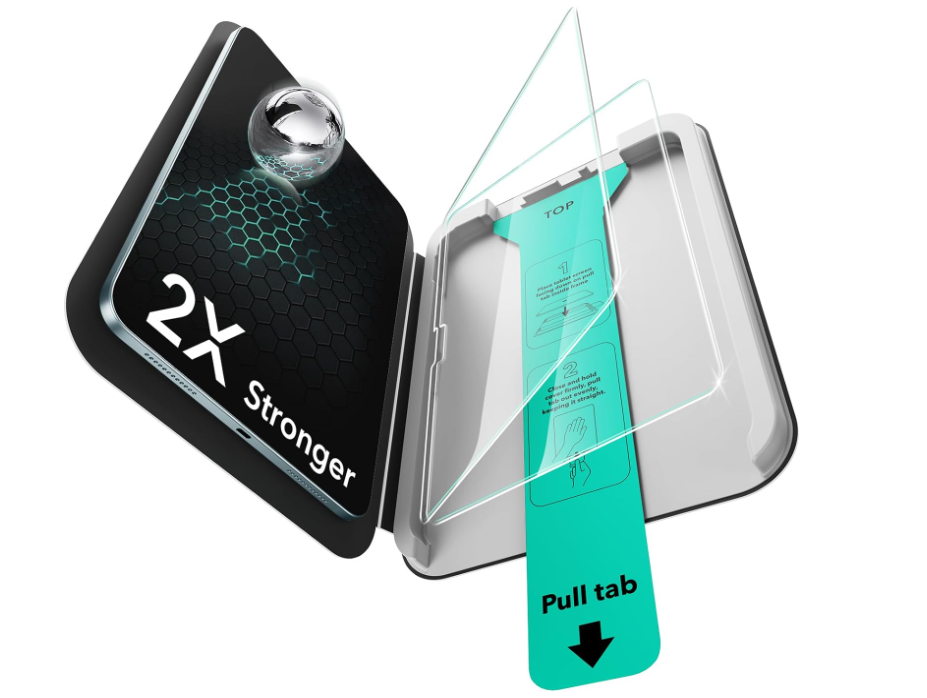
ESR UltraFitトレイ ガラス画面保護フィルム
モデルを選択します
ビデオを設定します
ビデオの方法
Video is coming soon
FAQ
貼り付け時、気泡やホコリの混入を防ぐ方法
画面保護フィルムが割れるのを防ぐにはどうしたら良いですか?
保護フィルムを確実に固定するにはどうすれば良いですか?
画面保護フィルムについた汚れや指紋はどうすればきれいになりますか?
届いた商品が使用済みまたは破損していた場合、どうすれば交換してもらえますか?
保護フィルムを正しく貼り付ける方法
How does the ESR warranty work?
All ESR products include a 12-month warranty. Register your product to extend it to 24 months.
Need help? Our support team will reply within one business day.
After-sales help
保証を延長する
Need help? Our support team will reply within one business day.
Useful?
ESR UltraFitトレイ ガラス画面保護フィルム
モデルを選択します
ビデオを設定します
ビデオの方法
Video is coming soon
FAQ
貼り付け時、気泡やホコリの混入を防ぐ方法
綺麗な仕上がりのために、同梱の取扱説明書やガイド動画の手順に従って貼り付けてください。以下のポイントに気を付けると、気泡のない貼り付けを実現できます。
- ホコリや汚れを完全に取り除いくまで、iPadの画面をキレイに拭いてください。
- 付属のホコリ取りシールまたはマイクロファイバークロスを使用して、ホコリや糸くずを取り除いてください。
- 貼り付けた後、気泡が発生した場合は、保護フィルムの端をやさしく持ち上げ、空気を端へ押し出した後、マイクロファイバークロスでしっかり押さえて密着させてください。
開封時に、保護フィルムと保護シートの間に気泡が見えることがありますが、これは正常であり、実際の貼り付けや接着には影響しません。
画面保護フィルムが割れるのを防ぐにはどうしたら良いですか?
破損の危険性を減らすため、特にエッジやコーナー部では、硬い物の直接の接触や衝撃を避けてください。
保護フィルムを確実に固定するにはどうすれば良いですか?
ホコリや水分が付着し、シワや剥がれの原因となるため、画面保護フィルムを貼った後は、水で洗ったり、粘着面をアルコールで拭くことは避けてください。
画面保護フィルムについた汚れや指紋はどうすればきれいになりますか?
- 指紋や汚れはクリーニングクロスで軽く拭くだけで落とせます。高精細強化ガラスには特殊な防指紋コーティングが施されており、汚れが付きにくく、お手入れが簡単に行えます。
- マット施工済みの強化ガラスライティングフィルムは、ウェットティッシュで表面を拭くことができます。定期的にクリーニングすることで、透明度と性能を維持することができます。
届いた商品が使用済みまたは破損していた場合、どうすれば交換してもらえますか?
お手元に届いた商品の写真を送付先住所とともにお送りください。無料で交換品をお送りいたします。
保護フィルムを正しく貼り付ける方法
保護フィルムの上部には、位置合わせ用のカットアウトがあります。これらのカットアウトがUltraFitトレイのガイドと正確に一致するように合わせてください。
貼り付け作業を始める前、ガイド動画を視聴し、同梱の取扱説明書をご確認ください。
How does the ESR warranty work?
All ESR products include a 12-month warranty. Register your product to extend it to 24 months.
Need help? Our support team will reply within one business day.
After-sales help
保証を延長する
Need help? Our support team will reply within one business day.
Useful?


